Fhd 27inch monitor
Ktc M27P6
Best Fhd 27inch monitor – Luxury – 600 $ to 900 $
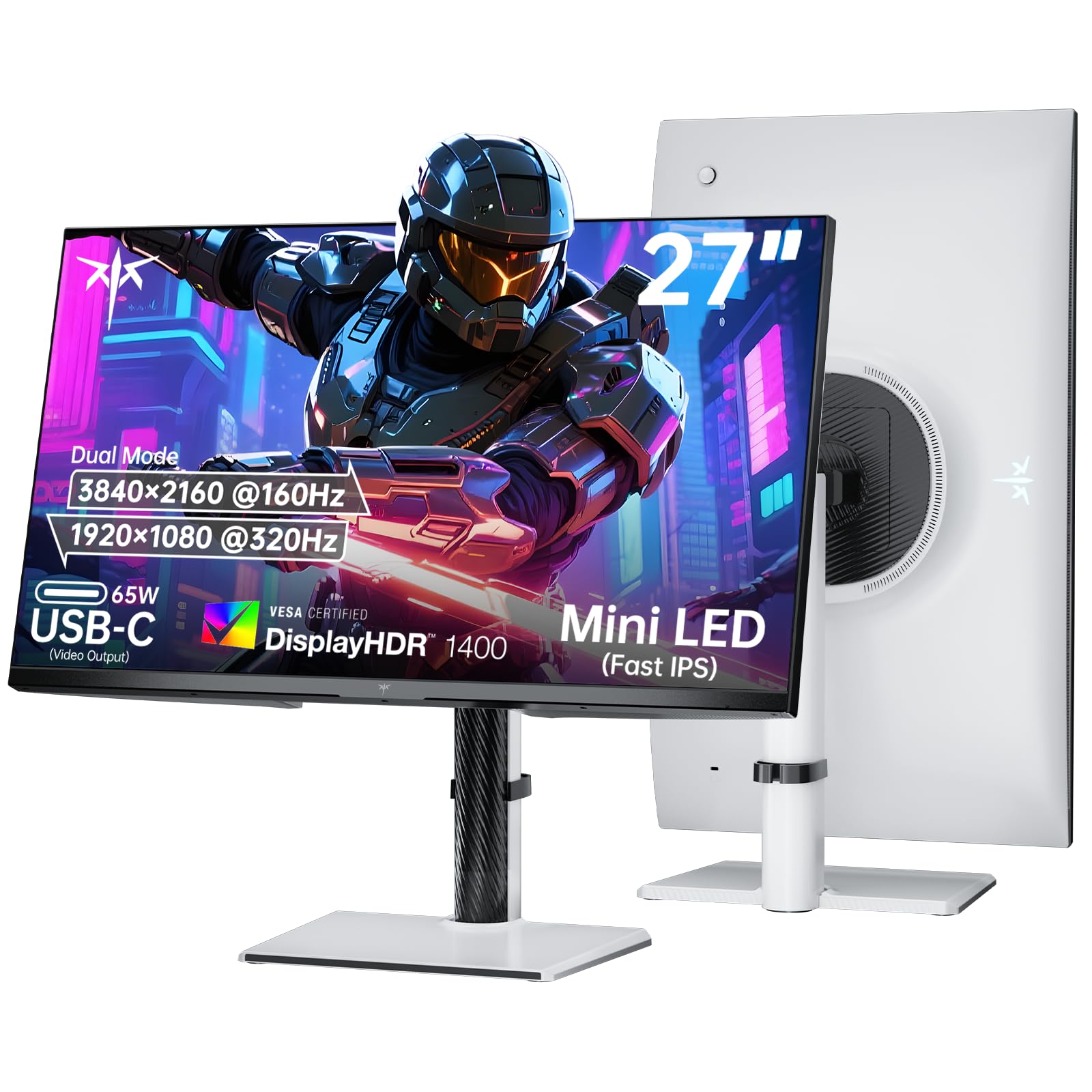
The KTC M27P6 is our Luxury pick for buyers who want one 27-inch monitor for detailed 4K work and fast competitive play. Published tests found unusually strong HDR brightness, deep local-dimming contrast and accurate colour after adjustment. Its second mode can trade 4K detail for 320 Hz motion, while USB-C power delivery and the adjustable stand make it practical beyond gaming.
Why the KTC M27P6 stands out
The M27P6 earns the Luxury position by combining two kinds of performance that usually pull in different directions. IGN measured up to 1,612 nits in HDR and Delta E below 1.71 in sRGB mode. NoobFeed also found the advertised HDR brightness and a broad colour range. That gives the panel both impact in bright HDR scenes and a credible starting point for colour-sensitive work, provided you adjust the picture mode when needed.
Choose the KTC M27P6 if you want a premium-feeling 27-inch display without giving up speed. The tests cited here found very bright HDR, deep blacks from local dimming, broad colour coverage and a sharp 4K image. The dual-mode design is the main reason it rises above ordinary 27-inch options: use 4K at 160 Hz for detail, or switch to 1080p at 320 Hz when fast motion matters. Buyers also praise its image, matte finish, adjustable stand and usefulness for editing and content creation. A small number of buyers reported a dead-pixel cluster, so inspect the panel promptly after delivery.
Who it’s for For gamers, creators and multi-monitor users who want sharp 4K detail, high HDR impact and a fast mode in one screen.
What sets it apart
- Very bright HDR with strong local-dimming contrast, according to IGN, PCMag Middle East and NoobFeed.
- Sharp 4K presentation and a 320 Hz 1080p mode for competitive play, as described by the tests.
- Wide colour coverage; buyers also report vibrant, bright and sharp images.
- USB-C power delivery, rich connectivity and an adjustable stand add flexibility.
- The matte panel helps reduce reflections; one buyer found it useful for video editing and astrophotography.
What to know
- The tested 1080p 320 Hz mode can look slightly soft for desktop work because it lacks integer scaling.
- Tests and buyer reports both point to picture adjustment: native colours can be oversaturated, HDR needs tuning, and one buyer noticed backlight visibility and viewing-angle problems on dark images.
- One verified buyer reported a concentrated area of dead pixels and needed a replacement.
What the tests found
- IGN measured 707 nits in SDR and 1,612 nits in HDR, with roughly 1,000:1 native static contrast before local dimming.
- PCMag Middle East found strong HDR, deep blacks and a matte finish, but noted that the 1080p 320 Hz mode is slightly blurred for desktop use.
- NoobFeed measured 99.3% sRGB, 89.1% AdobeRGB and 95% DCI-P3 coverage, while warning that default colours can be too saturated.
- DisplayNinja’s summary credits the monitor’s 1,152 local-dimming zones, 163 PPI 4K sharpness, USB-C 65 W power delivery and KVM; it also notes blooming in demanding dark scenes.
Buyers broadly reinforce the test results. One verified owner replacing older 22-inch displays praised the larger matte screen for editing and astrophotography, with little glare and low heat. Other buyers describe the image as bright, sharp and vibrant, and praise the adjustable stand. These are buyer experiences, not a guarantee for every unit. The recurring trade-off is setup: colour may need calibration or sRGB mode, HDR may need adjustment, and the on-screen menu is not universally considered simple.