Usb-c docking station
We picked the best product across 5 price ranges.
USB-C docking stations turn a laptop into a desk setup with one cable, but the details matter: how many monitors you need, whether the dock relies on DisplayLink or native USB-C/Thunderbolt video, and how much power it can send back. In this selection, you’ll find practical options such as dual DisplayPort with VGA and HDMI plus 100W Fast Charging, 14-in-1 hubs with 2 x 4K HDMI and 80W Power Delivery, and higher-end docks with Gigabit Ethernet or 120Gbps Thunderbolt 5.
Budget
⭐ 4.3

The Selore&S-Global Dual DisplayPort Docking Station stands out in its category by offering dual 4K@60Hz DisplayPort outputs, a feature rarely seen in more accessible options. This capability, combined with HDMI and VGA outputs, allows for versatile multi-monitor setups, accommodating up to four displays. Its 100W USB-C PD charging port ensures that your devices remain powered, a significant advantage over lower-tier options that lack such robust charging capabilities. While higher-tier products may include additional features like a bundled charger or extended multi-display support for macOS, these additions often come with a steep price increase. For users primarily on Windows or those who can manage without extended display on macOS, this docking station delivers essential functionality without unnecessary cost. Its compatibility with both USB-C and Thunderbolt 3/4 laptops further broadens its appeal, making it a practical choice for those seeking efficiency and performance without venturing into premium pricing.
Performance
⭐ 4.3

Choose the Anker USB-C Hub (14-in-1) when your laptop is the centre of a multi-monitor desk and you want display expansion, charging and peripherals handled through one connection. Buyers describe the station as well made, and individual reports praise its Ethernet speed and audio output. A buyer using it with an HP EliteBook reported two extra monitors and simultaneous laptop charging; another reported full Ethernet speeds and 24/96 audio from the dock’s DAC.
The reservation is reliability. Amazon's buyer summary records 13 unfavorable durability mentions out of 16, including reports of a short service life after six months or around a year, while some buyers also report HDMI or USB ports stopping work.
High-End
⭐ 4.5

The Plugable UD-3900 is our High-End choice for a work laptop that needs a two-screen desk and a large collection of peripherals. We retain it for the combination buyers repeatedly value: easy access to two monitors, six USB ports and a single connection for the desk accessories. A verified buyer ran two 1920x1080 displays, Gigabit Ethernet, a keyboard and a mouse through the dock and reported no lag in ordinary office work.
The important limit is power. Home Office Research and GadgetsFind both note that the dock does not recharge the laptop; its own charger must remain connected. Home Office Research also finds DisplayLink less suitable for very dynamic content and modern high-resolution use. That makes this a work-and-productivity dock, not the right choice for a 4K or graphics-heavy setup.
Luxury
⭐ 4.3
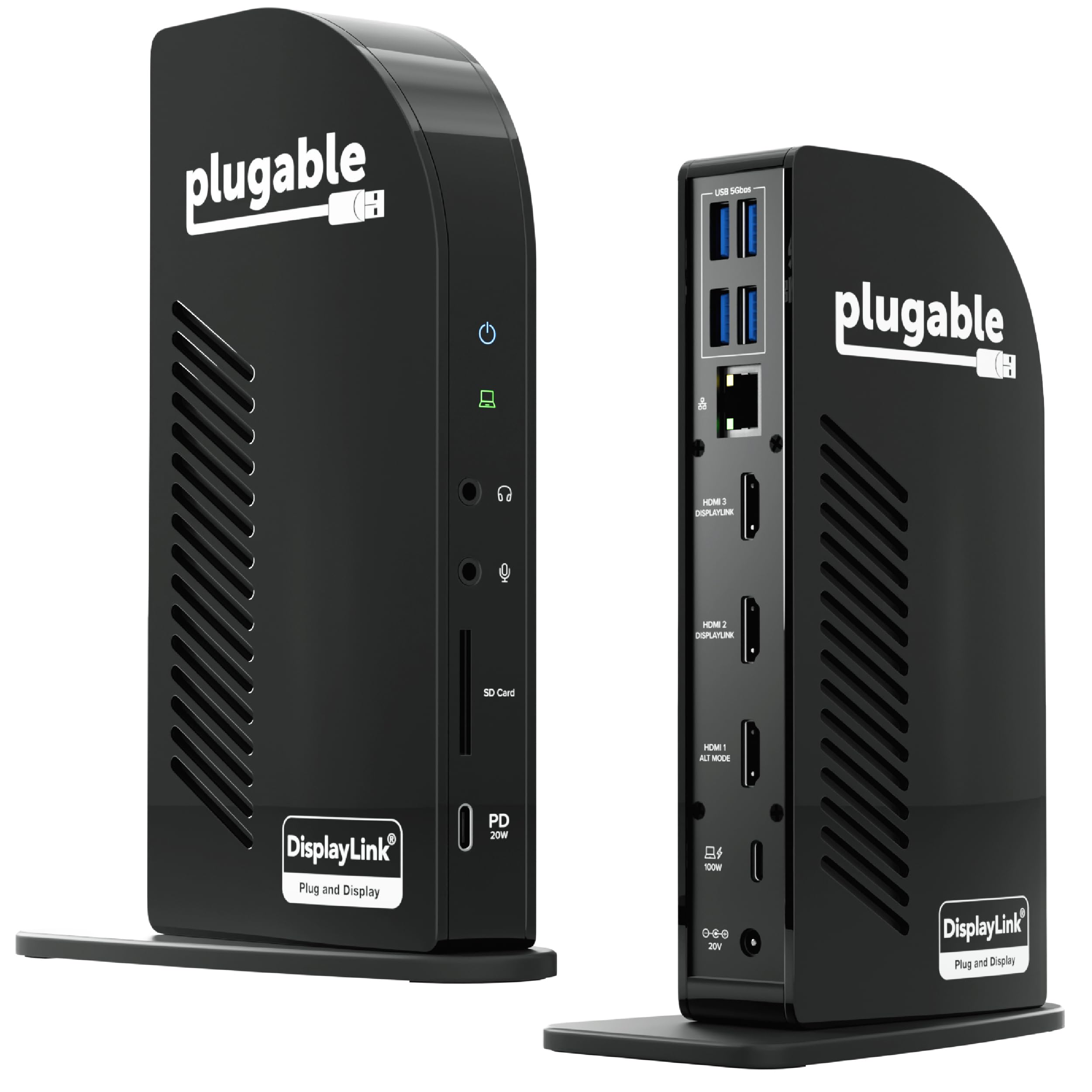
Choose the Plugable UD-ULTCDL if your priority is a flexible office dock for several HDMI displays and a large set of peripherals. Buyers repeatedly praise its functionality, connectivity, easy setup, and charging. They report that a single USB-C connection can bring together monitors and accessories, and several Mac users say it extends display support beyond what their computer normally offers. Avis de Gemini, citing PCMag, describes it as a versatile office solution with clear video and audio and effective laptop charging. The important limit is reliability: a small group of buyers report needing to restart the dock or disconnect and reconnect it, sometimes repeatedly. That makes it a strong fit for a feature-rich desk, but a less comfortable choice if uninterrupted plug-and-play operation matters most.
Indecent
⭐ 4.2

The Anker A83B5 Docking Station stands out by offering a robust 14-in-1 connectivity suite, including Thunderbolt 5 ports that enable a maximum transfer speed of 120Gbps. This feature is critical for users who frequently handle large files, as it can move a 150GB file in just 25 seconds. Unlike more accessible models, this docking station supports dual 8K@60Hz displays, a capability typically reserved for higher-end products, making it ideal for graphic designers or video editors who require high-resolution outputs. Additionally, the 140W max charging capability ensures efficient power delivery, supporting the PD 3.1 protocol, which is not commonly found in more basic options. While moving up to a more expensive model might offer marginally better features, the cost increase is not justified unless you need extreme performance levels that exceed this station's already impressive specifications. The Anker A83B5 provides a balanced mix of advanced features and reasonable cost, making it a compelling choice for those who need more than basic options but don't want to overpay for unnecessary extras.
What changes from one range to the next
Budget starts with flexible, lower-cost connectivity, adding dual DisplayPort, VGA, HDMI, and 100W charging for mixed monitor setups. Performance moves to denser 14-in-1 hubs, triple-display support, 2 x 4K HDMI, 1080p VGA, and 5Gbps USB-A/C data ports for faster peripherals. High-End shifts to fuller workstation docks like Plugable UD-3900, with dual HDMI, USB 3.0 or USB-C input, and Gigabit Ethernet, usually in a driver-based DisplayLink setup. Luxury adds 13-in-1 triple-monitor output and 100W charging. Indecent goes to Thunderbolt 5 with 120Gbps transfer, 140W charging, cooling, and ambient LED lighting.